PC & Store Check
Drink the Ocean Steam Check and PC Browser Guide
If you searched for Drink the Ocean Steam to buy or install the game on PC, here is our store check: in November 2026, searching the Steam store for "drink the ocean" returned zero results.
You do not need Steam or a desktop download to play Pinidi Studio's release. This site provides no installer package—the game runs directly in your PC web browser on our home page for free.
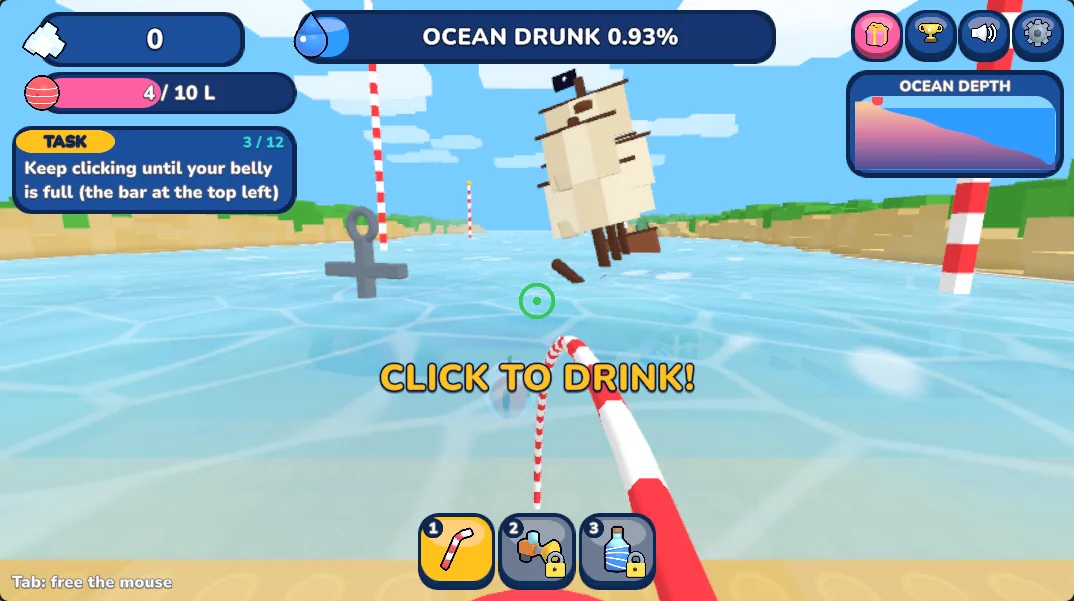
Steam Check and PC Browser Setup Summary
What we verified when checking Steam and testing how Pinidi Studio's version behaves in a desktop browser.
| Topic | Verified Fact | What to Do on PC |
|---|---|---|
| Steam store search | In November 2026, searching Steam for "drink the ocean" returned 0 results | Play free in your browser instead of hunting for a Steam key |
| Install files | This site provides no installer or PC download package | Press Play on the home page to load inside the frame |
| Fullscreen & cursor | Mouse is captured to look around; Tab frees the pointer | Press Tab, then click the Fullscreen button below the player |
| School / work networks | Game files load directly from playgama.com | Works only on networks that allow playgama.com |
| Save behaviour | Handled by Playgama in your browser; duration unconfirmed | Do not expect Steam-style cloud sync across devices |
Did we find Drink the Ocean on Steam in November 2026?
In November 2026, we searched the Steam store interface for "drink the ocean" and got zero results. Because of that, there is no Steam store link we can point PC players to.
The version embedded on this site is a web game played directly in a web browser, credited to Pinidi Studio on Playgama and dated November 2026. This unofficial fan page does not host or modify game files and does not provide any installer or download package.
How do you play on a PC browser without Steam?
Playing in a PC browser takes one click. Open the drinktheocean.co home page, press the Play button on the cover image, and wait a few moments while the 3D game loads from Playgama inside the same frame.
There is no account sign-up and no fee on this site, though Playgama's player may display its own ads. Playgama also lists 16 supported languages for the game, including English, Spanish, Portuguese, French, German, Japanese, Korean, and Chinese. Note that this is the single-player release; if you saw a four-person desktop clip and want to know how the two games differ, check our multiplayer comparison.
What are the PC keyboard controls, fullscreen mode, and Tab key?
On a computer, Pinidi Studio's version uses standard first-person browser controls listed on Playgama. Because the game locks your cursor so you can look around with the mouse, knowing the Tab shortcut saves confusion when you want to toggle Fullscreen or scroll down the page.
To switch to Fullscreen, click the Fullscreen button right below the player box on the home page. You can also press T at any time during a run to return to the beach quickly instead of walking back across the sand to the PRESS.
Full PC control list from Playgama
- W A S D
- Move across the beach and to the water's edge
- Mouse
- Look around in first person
- Left click
- Drink seawater through the straw
- Space
- Jump
- 1 2 3
- Switch tools once you unlock more than one at the SHOP pad
- T
- Go home to the beach quickly
- E
- Open gifts handed out by the Sky Duck
- P
- Open in-game settings
- Tab
- Free the captured mouse cursor to click buttons under the player
What should you do if the game gets stuck loading on PC?
Because Drink the Ocean is a 3D game, the loading screen needs a short wait on first launch—do not refresh immediately if the glass animation is still running.
If nothing appears after waiting, reload the page, try another desktop browser, or turn off an ad blocker for this page, since the player loads from playgama.com. If you are playing on a school or office network and the player stays stuck on loading for a long time, that network is likely blocking playgama.com.
Does PC browser progress save like a Steam cloud save?
No cross-device cloud save is guaranteed. When you press Play, your browser connects directly to Playgama, which handles saving in your browser under its own policy rather than on drinktheocean.co.
We have not confirmed how long Playgama keeps a browser run. Do not count on your salt or upgrades following you to another computer or surviving cleared browser data, and remember that this fan page cannot restore lost progress. If you also want to play on a phone later, read our mobile browser guide.
Steam & PC Browser FAQ
Is there a Drink the Ocean page on Steam?
In November 2026, searching the Steam store for "drink the ocean" returned zero results, so we have no Steam link to share.
Can I download a PC installer or EXE file from this site?
No. This site does not provide any installer or download package. The game runs directly inside your web browser on our home page.
Why is my mouse cursor stuck inside the game window?
The game captures your mouse so you can look around in first person. Press Tab to free your cursor whenever you want to click Fullscreen or other page buttons.
Why does loading freeze on a school or work computer?
The player loads directly from playgama.com. If your network blocks that address or an ad blocker interferes with it, the loading screen may hang.
Will my browser progress stay if I switch PCs?
Do not count on it. Playgama handles saving inside your local browser, retention length is unconfirmed, and this site cannot recover lost runs.
Play free in your PC browser right now
Skip the installer search—open the home page, press Play, and use WASD, Left click, and Tab to drain the sea.